

I use a lot of homemade YouTube videos as part of my lab courses. Most of the wet labs have a short (10–15 min) prelab video that covers whatever concept we’re exploring that week. Miami is also a little unusual (for US departments, at least), in that we teach the spectroscopy of organic compounds as part of the lab courses. In my classes, we do this using an inverted classroom approach, where the students watch longer (~40 min) lectures on IR spectroscopy, NMR spectroscopy, or mass spectrometry and then do an assignment in-class with help from me and the TAs.
So, there are a fair number of videos associated with these courses, most of which date from around the pandemic era. An ongoing problem, however, has been that the closed captions for these videos are just the ones generated automatically by YouTube, and they are terrible. Captioning by YouTube has improved in recent years, but 5 years ago it produced long, stream of consciousness rants free of punctuation or capitalization. Even for newly uploaded videos, the captions tend to have mistakes associated with misinterpreting chemistry words and are just too literal. I think the captions have more value if they edit out filler words (“um”) and correct misspeaking. (I have a bad habit of occasionally false starting sentences, double-speaking the first word or two. I don’t think it’s too bad in most of the videos, but I’d rather that the captions skip over mistakes like this.)
New standards associated with the Americans with Disabilities Act mean that all course videos now need to have quality captions. Honestly, though, I should have fixed these years ago. My wife and I can’t even watch Ted Lasso without turning on the closed captions. The value for students new to the chemistry “language” is obvious. The problem is that correcting hours of poorly constructed autogenerated captions by hand is extremely tedious.
I have recently become AI-curious, and this seemed like a good test project for an LLM. I am skeptical of most of the hype around LLMs, but if they are going to be useful for anything, surely it should be manipulating language.
I started by downloading the captions from YouTube in .srt format. To do this, you just log in to YouTube Studio, find the video, hit “Subtitles” on the right, hover over the “Published” cell in the table for the automatic captions, click the three dots, and hit download. The .srt format is just plain text with a sequence of timestamped captions, like so:
1
00:00:00,840 --> 00:00:06,720
all right so this is the pre-lab video

2
00:00:03,540 --> 00:00:09,420
for our lab activity on chirality and

3
00:00:06,720 --> 00:00:11,280
liquid crystals what are the goals of

4
00:00:09,420 --> 00:00:13,620
this lab well there's there's basically

5
00:00:11,280 --> 00:00:15,179
two purposes to this lab two things that
In theory, you just upload this to your favorite LLM, give it a prompt like “Correct the punctuation in this .srt file and give me a new one”, and let it go to work. In practice, that absolutely did not work for me using ChatGPT, Claude, or Gemini. I had access to the pro versions of Claude and Gemini while working on this but, in fairness, I never tried anything other than ChatGPT’s free version. I also tried various local LLMs installed using Ollama. Those never even came close to success (they would always just summarize the text). Claude told me that this was a common problem with small models, but maybe that was just big model elitism.
I constructed many prompts of varying complexity (many constructed with the help of one of the LLMs) but I could never get this .srt correction to work reliably, even for short input files. The problem was that the LLMs would tend to rewrite the text, which won’t work for captioning words I’ve already recorded. They also tended to start messing with the time stamps despite strict instructions to the contrary. These problems both tended to get worse the longer the file was, beyond even just a few minutes of speech.
After a lot of tinkering, what eventually has worked is to not convert the .srt files to another .srt file, but instead to have the LLM just produce the raw text and then upload that to YouTube without the timestamps. I think it’s easier for the model to stay on task if it only has to fix the text. It turns out YouTube doesn’t need the timing anyway; at least for my videos, it does a good job of matching up the text to the audio and it takes literal seconds.
I got the best results using Gemini 3 Pro in the “Thinking” mode. I also tried Claude Pro but it tended to go off-book after a while. Here is the prompt I am currently using. It’s a mouthful, but I have it saved as a Gemini Gem that I can just feed the files.
# Caption Correction Prompt

## YOUR TASK
Clean up auto-generated captions to be professional and readable while maintaining accuracy to the actual content spoken.

## ALLOWED CORRECTIONS

### 1. REMOVE THESE SPEECH ARTIFACTS
- Filler words: "um", "uh", "er", "ah"
- Doubled/stuttered words: "which which" → "which", "the the" → "the"
- False starts: "we're we're going" → "we're going"
- Excessive "like" when used as filler (keep when grammatically necessary)
- Excessive "you know" when used as filler

### 2. FIX TRANSCRIPTION ERRORS
Correct obvious sound-alike word mistakes based on context:
- "lewis structure" → "Lewis structure" (capitalization)
- "there" ↔ "their" ↔ "they're" (context-based)
- "to" ↔ "too" ↔ "two"
- "your" ↔ "you're"
- "its" ↔ "it's"
- Common technical terms that were misheard
- Obviously wrong words that don't make sense in context

When fixing transcription errors, consider:
- The subject is chemistry
- The sentence context
- Common technical terminology

### 3. ADD SOPHISTICATED PUNCTUATION
- Commas for natural pauses and clarity
- Periods at sentence ends
- Question marks for questions
- Ellipses (...) for trailing thoughts
- Em dashes (—) for interruptions or parenthetical thoughts
- Semicolons between related independent clauses
- Colons before lists or explanations

### 4. PROPER CAPITALIZATION
- Sentence beginnings
- The pronoun "I"
- Proper nouns (names, places, specific theories)
- Chemical compounds and technical terms as appropriate
- Acronyms

## PRESERVATION RULES
- KEEP the core meaning and content intact
- KEEP technical accuracy

## REMOVAL RULES
- DISCARD SRT subtitle numbering
- DISCARD SRT all timestamps

## FORBIDDEN ACTIONS
- DO NOT paraphrase or rewrite sentences
- DO NOT add content words that weren't spoken (only punctuation)
- DO NOT change technical terms unless fixing obvious errors
- DO NOT add explanations or comments
- DO NOT add citations

## OUTPUT REQUIREMENTS
- DO NOT add markup of any kind
- Return a plain text code block (```)
Here is the procedure I follow:
- Download the captions from YouTube in .srt format.
- Split the .srt file into multiple .txt files of about 200–250 blocks each (about 7–10 minutes of speech). I make sure each file begins and ends at a sentence break by just moving some words up or down. Note that the files are saved as .txt files, not .srt. I don’t know if this matters, but it might (using .srt caused problems in my early experimentation as the LLMs would think the context was coding).
- Paste in the prompt, upload the file, and start Gemini. It shouldn’t take long to process each file (maybe a minute or two). Start a new chat for each file.
- Copy the output and assemble into one large .txt file. There shouldn’t be any markup, but Gemini sometimes includes the
```indicating plain text. Delete this if it’s there. - Go back to the subtitles page for the YouTube video. Add the captions to the language (e.g., English) without timestamps (hover over the “Subtitles cell”, click “Add”, then “Upload file”).
- A few seconds after uploading, the captions should line themselves up with the video.
At this point, you can watch the video and make any last edits to the captions. I have done this more than a dozen times at this point, and, while I have made some adjustments, I have not had any issues that would have caused problems had I just posted and not checked. Your mileage may vary, of course.
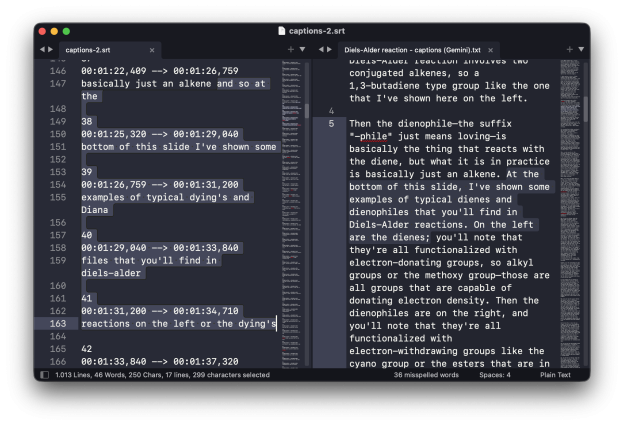
Some of the auto-captions I started with were truly atrocious. Here is an excerpt of the .srt file for a lecture on the Diels–Alder reaction:
70
00:02:36,230 --> 00:02:43,040
and those ones work as well ok so what

71
00:02:40,460 --> 00:02:44,510
exactly is this reaction so we have our

72
00:02:43,040 --> 00:02:46,640
dying and we have our die you know file

73
00:02:44,510 --> 00:02:48,590
the dying has to be able to assume

74
00:02:46,640 --> 00:02:50,390
what's called the s cyst confirmation
And here is what Gemini came up with, unaltered by me:
...and those work as well.

Okay, so what exactly is this reaction? We have our diene and we have our dienophile. The diene has to be able to assume what's called the s-cis conformation...
Other instances of “dienophile” in the original captions were recorded as “dinah file”, “diana file”, “Dyna file”, “Dino file”, “dyeing a file”, and “dye oenophile”. It is remarkable how the LLM is able to take the chemistry context into account in its corrections.
The corrections are sometimes actually too good. I occasionally misspeak in my narration. For example, maybe I say “carbon” instead of “proton” when talking about some NMR assignments. The LLM will usually catch these errors and correct them. So I have a conundrum: what should the captions say—should they accurately reflect what I said, which was wrong, or should I let them correct the error? I’ve generally let them fix the error because it feels weird to compound a mistake by making it twice. But I’m not sure what best practices are. I guess I could just ask Gemini.